One suite. Four focused video tools.

Create more with every video moment.

Ezy Capture is a growing suite of simple mobile apps for compressing large videos, creating smooth boomerang loops, making animated GIFs, and extracting high-quality photos from video. Choose the tool you need—without the complexity of a full video editor.

4 appspurpose-built tools
Android + iOSavailability varies by app
Fast workflowsmade for everyday creators
Ezy Video to Photo frame extraction interface
Ezy Capture animated GIF interface
Compress • Loop
GIF • Capture
Choose the right tool

Meet the Ezy Capture app suite

Each app solves one clear video task. Download only what you need and use the correct store button for your device.

Video Compressor

Compress MP4 • Android only

Free up phone storage by reducing large video files while keeping a practical balance between quality and size. Compress one video or process multiple videos in a batch.

  • Single and bulk compression
  • HD, Full HD, 4K and MP4
  • Auto and advanced modes
  • Resolution and bitrate controls
  • Background processing queue
  • On-device video workflow
Android available

Ezy Boomerang

Looping Video Maker • Android & iOS

Turn ordinary clips into smooth forward-reverse boomerangs, repeated loops and rewind effects for Reels, TikTok, Shorts, Status and creative social posts.

  • Forward-reverse boomerangs
  • Repeat videos seamlessly
  • Reverse playback effects
  • Trim and crop clips
  • High-quality social export
  • Fast, lightweight workflow
GIF

Ezy GIF Maker

Video & Photo to GIF • Android only

Create expressive animated GIFs from MP4 video clips or a sequence of photos. Trim the moment, arrange images and share the finished animation with friends or social audiences.

  • Video to GIF conversion
  • Photo to GIF creation
  • MP4 video support
  • Trim clips before export
  • Arrange photo sequences
  • Easy social sharing
Android available

Video to Photo & Frames

Original-quality frame extraction • Android & iOS

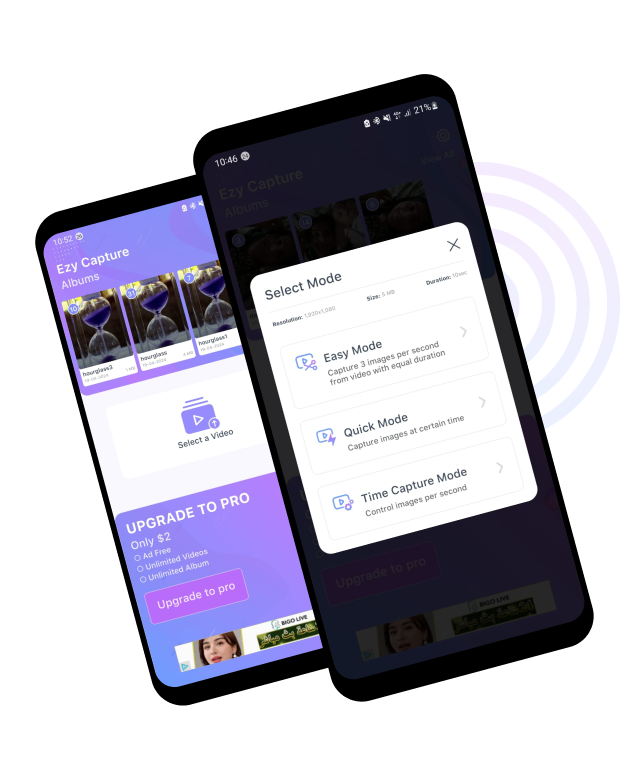
Find the perfect photo inside any video. Extract clear frames, create thumbnails, capture images at timed intervals, edit selections and organize saved moments.

  • Original-quality extraction
  • Quick and Time Capture
  • Easy and Advanced modes
  • Best-frame selection
  • Crop, rotate and bulk edit
  • Albums and gallery export
A complete creator workflow

From large raw video to shareable content

Use one app or combine the suite across different stages of your mobile content workflow.

1CompressReduce large files and recover storage
2LoopCreate boomerangs and reverse clips
3AnimateConvert videos or photos into GIFs
4CaptureExtract the best photo from a video
Built for real mobile workflows

Why creators choose focused tools

The Ezy Capture suite avoids a crowded, complicated editor. Each app is designed around a clear result.

01

Easy to Learn

Clear controls help casual users and creators complete common video tasks without learning a desktop editing timeline.

02

Purpose Built

Open the right app for compression, loops, GIFs or photo extraction instead of navigating unrelated editing features.

03

Social Ready

Create content suited to Instagram Reels, TikTok, YouTube Shorts, WhatsApp Status and messaging apps.

04

Quality Controls

Use advanced options where available for resolution, bitrate, frame timing, clip length and output quality.

05

Fast Results

Focused screens and straightforward workflows reduce the number of steps between selecting media and exporting it.

06

Platform Clarity

Every app card shows its supported stores, so Android and iPhone users can download the correct version.

Video to Photo and Frames mobile app interface
Featured app

Ezy Video to Photo & Frames

The original Ezy Capture experience remains a key part of the suite. It helps you recover the exact photo you missed while recording a wedding, birthday, trip, sporting moment, pet, performance or family event.

Use Quick Capture to tap the moment you want, Time Capture to extract images at selected intervals, or Easy and Advanced modes for automatic or controlled frame selection. Original-quality extraction keeps frames sharper, while editing and album tools help prepare the final image.

  • Make thumbnails and social previews from video
  • Capture multiple frames from long recordings
  • Select clearer moments after the event
  • Save extracted images to your gallery
Mobile video tools explained

Four ways to get more from your videos

Video compression reduces the storage space required by recordings. It is useful for large 4K camera videos, travel footage, long clips and files that are difficult to share. The Ezy Capture Video Compressor supports individual and bulk workflows, with automatic settings for convenience and advanced controls for resolution, bitrate and audio.

Boomerang and loop creation turns a short moment into repeating motion. A forward-reverse boomerang plays a clip ahead and backward, while a video looper repeats it several times. These effects work well for product showcases, dance moves, fitness poses, travel scenes, food clips, pets and short-form social posts.

GIF creation converts a section of video or a sequence of photos into a lightweight animated image. GIFs are useful for reactions, demonstrations, memes, messaging and visual explanations. Ezy GIF Maker lets Android users trim MP4 clips or arrange photos before sharing an animation.

Video frame extraction saves individual moments from recorded footage as still images. It is ideal when a video captured the event but you missed the perfect photo. Ezy Video to Photo and Frames supports manual, automatic and interval-based capture for thumbnails, memories and shareable images.

Frequently asked questions

About Ezy Capture apps

Platform availability, features and the best app for each task.

What is Ezy Capture?

Ezy Capture is a suite of focused mobile tools for video compression, boomerang and loop creation, GIF making, and video-to-photo frame extraction.

Are all Ezy Capture apps available on iPhone?

No. Ezy Boomerang and Ezy Video to Photo & Frames have iOS versions. Video Compressor and Ezy GIF Maker are currently linked for Android only.

Which app reduces video file size?

Video Compressor: Compress MP4 is designed to compress single or multiple videos and supports HD, Full HD, 4K and MP4 files on Android.

Can I bulk-compress several videos?

Yes. The Android Video Compressor supports bulk compression, background processing and a queue for handling multiple files.

Which app makes boomerang videos?

Ezy Boomerang creates forward-reverse boomerangs, repeated video loops and reverse playback clips on Android and iPhone.

Can I trim a clip before making a loop?

Yes. Ezy Boomerang includes trimming and editing controls so you can prepare the right part of a clip before applying loop or reverse effects.

How can I turn an MP4 video into a GIF?

Use Ezy GIF Maker on Android to select an MP4 file, trim the section you want and convert it into a shareable animated GIF.

Can Ezy GIF Maker animate photos?

Yes. You can choose multiple photos, arrange them in sequence and turn the set into an animated GIF.

Which app extracts pictures from video?

Ezy Video to Photo & Frames extracts original-quality still images, multiple frames and potential thumbnails from recorded or downloaded videos.

What capture modes are available?

Video to Photo includes Quick Capture, Time Capture, Easy Mode and Advanced Mode for different levels of speed and control.

Can I use Ezy Capture apps for social media?

Yes. The suite can help prepare smaller videos, looping clips, GIFs, thumbnails and still images for Reels, TikTok, Shorts, Status and messaging.

Do I need every app in the suite?

No. Each app is standalone. Download the tool that matches your task, or combine several apps when your workflow needs compression, effects and captured frames.

One video. More ways to create.

Compress it, loop it, animate it or capture the perfect frame with the Ezy Capture app suite.

Choose an Ezy Capture App